First steps with VNCfluid
By the end of this tour you will know how to read and reshape your My Day.
1. Open My Day
Section titled “1. Open My Day”Open VNCfluid from the portal. My Day is the default view.
2. Read the cards
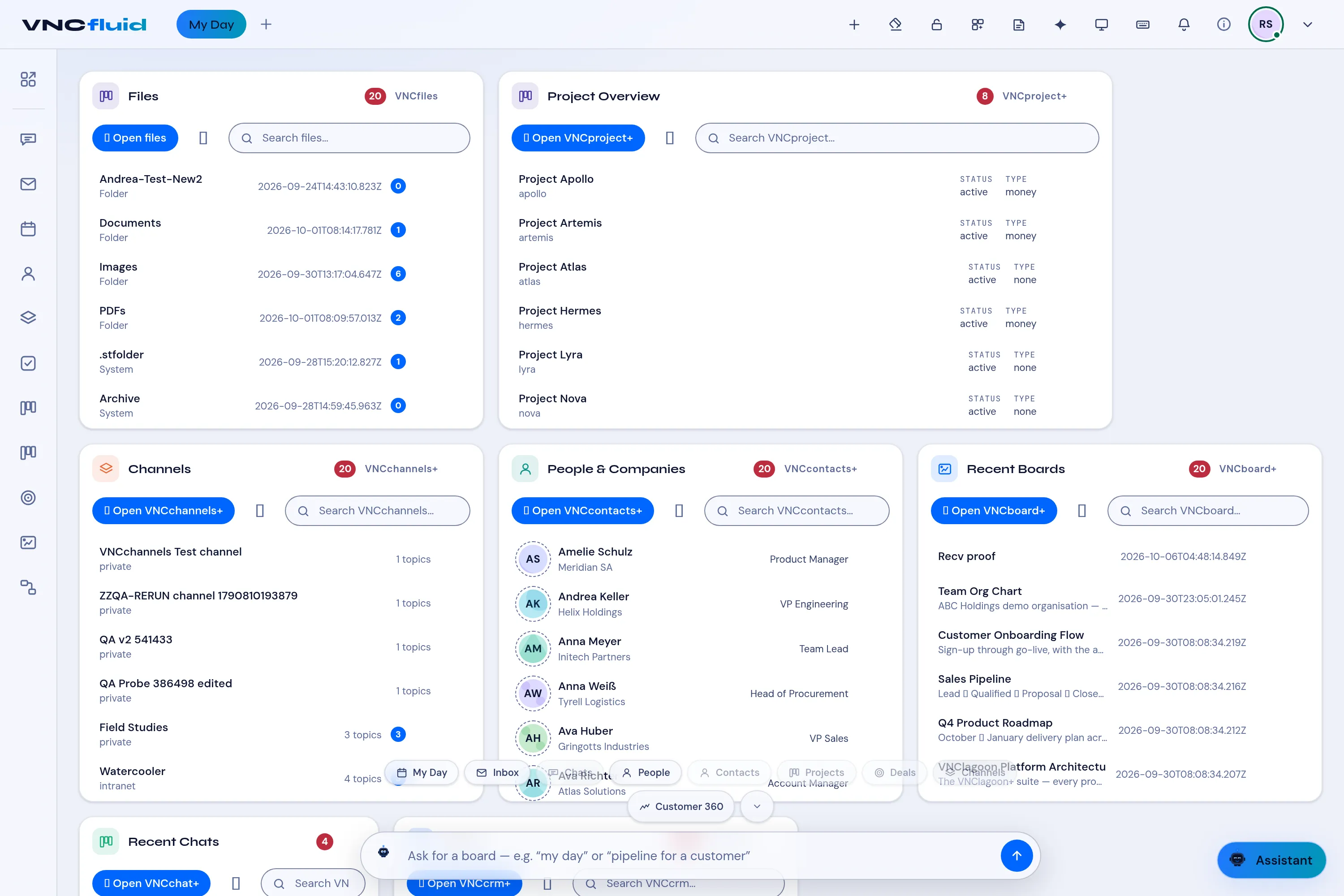
Section titled “2. Read the cards”Each card reads from another product: Project Overview (VNCproject+), Channels (VNCchannels+), People & Companies (VNCcontacts+), Recent Boards (VNCboard+), Recent Chats (VNCchat+), Deals (VNCcrm).
3. Jump or filter
Section titled “3. Jump or filter”Use a card’s Search to filter it, or Open … to jump to the product.
4. Ask the bar
Section titled “4. Ask the bar”In the bottom bar, type a request — my day, pipeline for a customer — or pick a quick chip (My Day, Inbox, Chats, People, Deals, Channels). Select + to add a card.
What you learned
Section titled “What you learned”- My Day is a dashboard over the other products, not its own data.
- The bars reshape it around what you need right now.