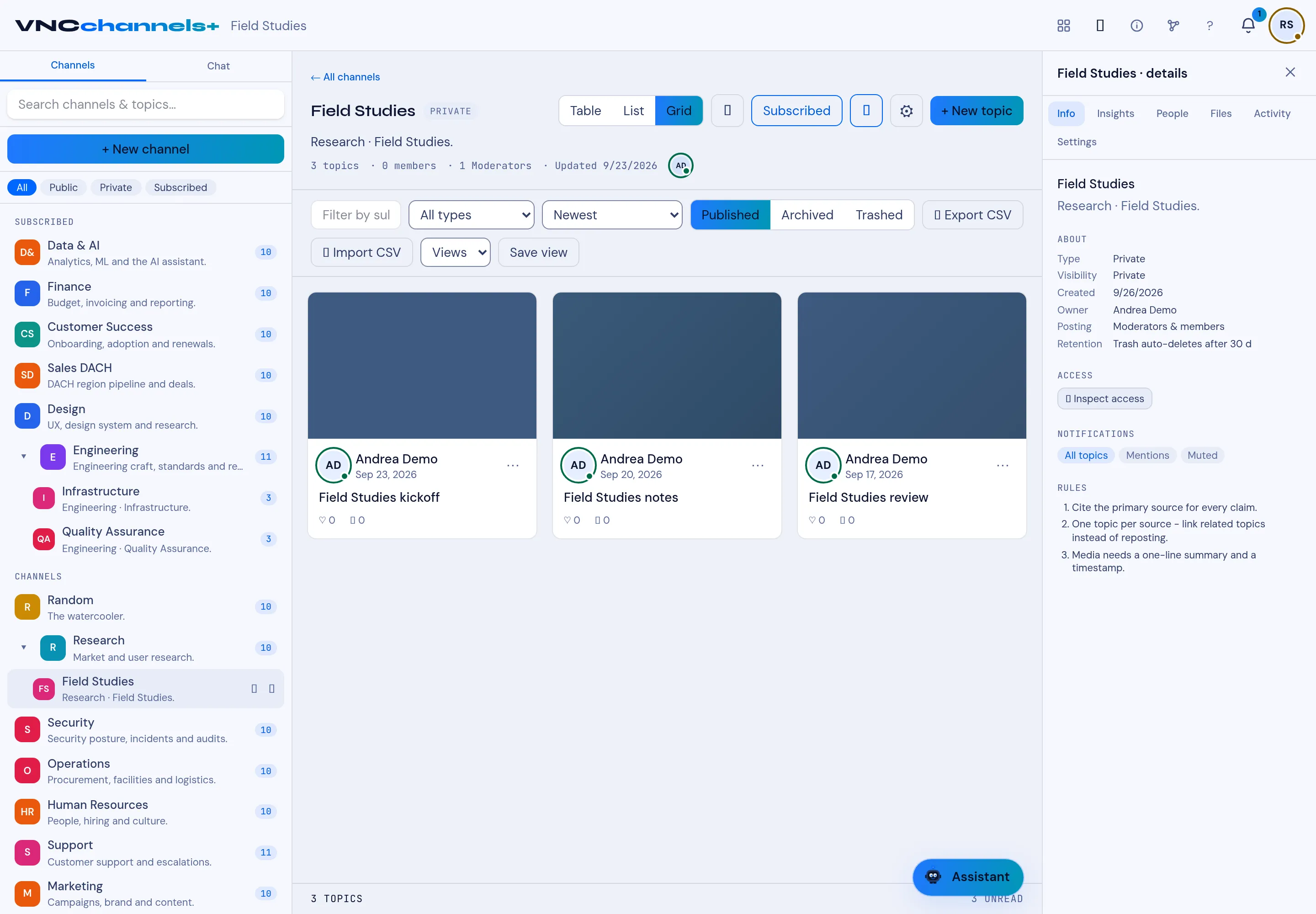
The channel view
Opening a channel shows the topics View, the filter bar and the Details rail.
Header
Section titled “Header”- ← All channels and the channel name, with its type (for example PRIVATE).
- Table / List / Grid — the layout of the topic view.
- Subscribe (or Subscribed) — your subscription to the channel.
- + New topic — publish a topic — see Publish a topic.
- The line under it: topic count, members, moderators and the last-updated date.
Filter bar
Section titled “Filter bar”| Control | Does |
|---|---|
| Filter by sub | Filter topics by subchannel. |
| All types | Filter by topic type. |
| Newest | Sort order. |
| Published / Archived / Trashed | The state of topics you are looking at. |
| Export CSV / Import CSV | Take the topics out, or bulk-import them. |
| Views / Save view | Apply a saved view, or save the current filters as one. |
Topic grid
Section titled “Topic grid”Below, PINNED topics appear first, then the topic cards, then a footer with the topic count and unread count. Select a card to read it — see The topic card.
The Details rail on the right is documented in Channel details and settings.