The left navigation
The VNCfiles sidebar (left) has three groups: the views, the Sync & devices group, and your files (your folders, items shared with you, and the app collections products write to) — plus Trash and Settings at the bottom.
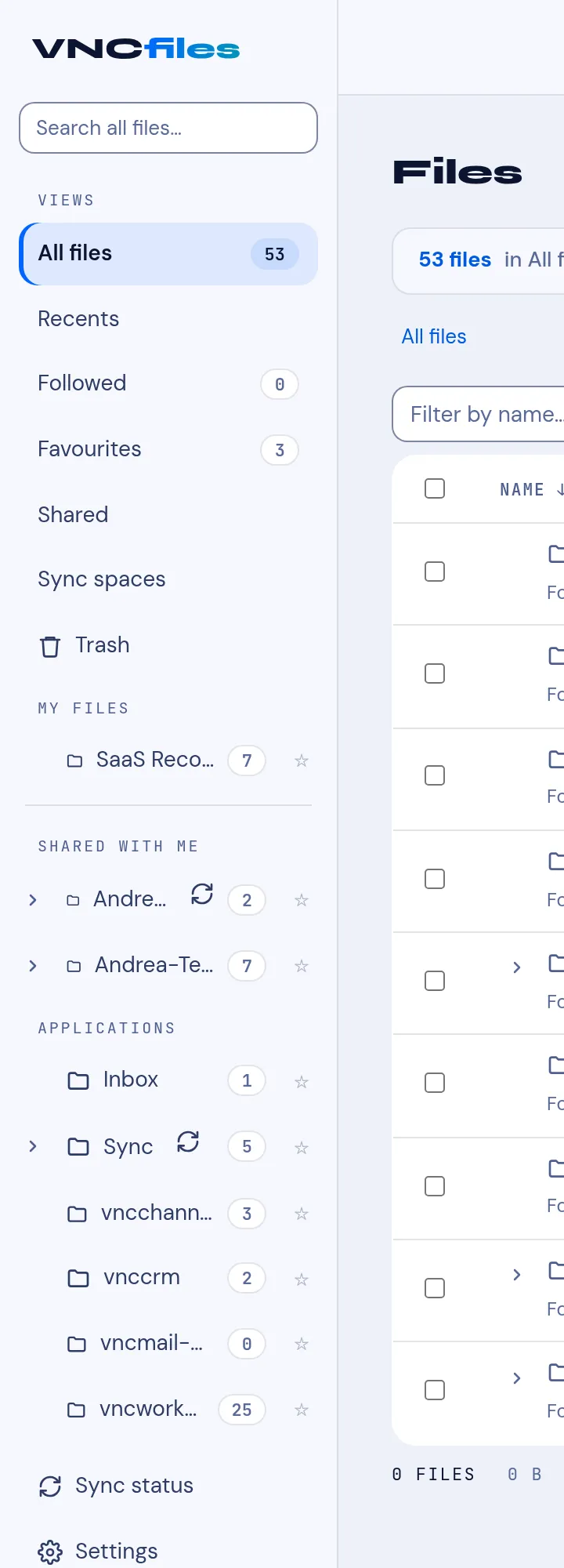
| View | Shows |
|---|---|
| All files | Everything you can see (with a count). |
| Recents | Recently touched files. |
| Favourites | Files you starred (★). |
| Sharing | Items you shared, and items shared with you. |
→ Views and file fields · Following and favourites
Sync & devices
Section titled “Sync & devices”| Item | What it is |
|---|---|
| Synced files | A view of the files inside your sync-space folders. |
| Sync console | The management panel: problems, devices & spaces, and each space’s runs. |
→ Synced files and the Sync console
My files
Section titled “My files”- Your own folders (each with a count; expand to see sub-folders).
- An Only followed chip filters the tree to the folders you follow (a Follow subscribes you to notifications; it is not a view).
- Shared with me — folders others shared with you.
- Applications — folders products keep your files in (Transfers, and one per product such as vncchannels, vnccrm, vncmail-plus, vncworkflow). These are app-owned: upload and new-folder are hidden, and the header shows Managed by ….
→ Create a folder · Upload a file · Share a file or folder
Bottom
Section titled “Bottom”- Trash — deleted files (restore, or delete forever).
- Settings — preferences and sync.
→ Settings