First steps with VNCdirectory+
By the end of this tour you will have found someone and read a unit’s entitlement.
1. Open the directory
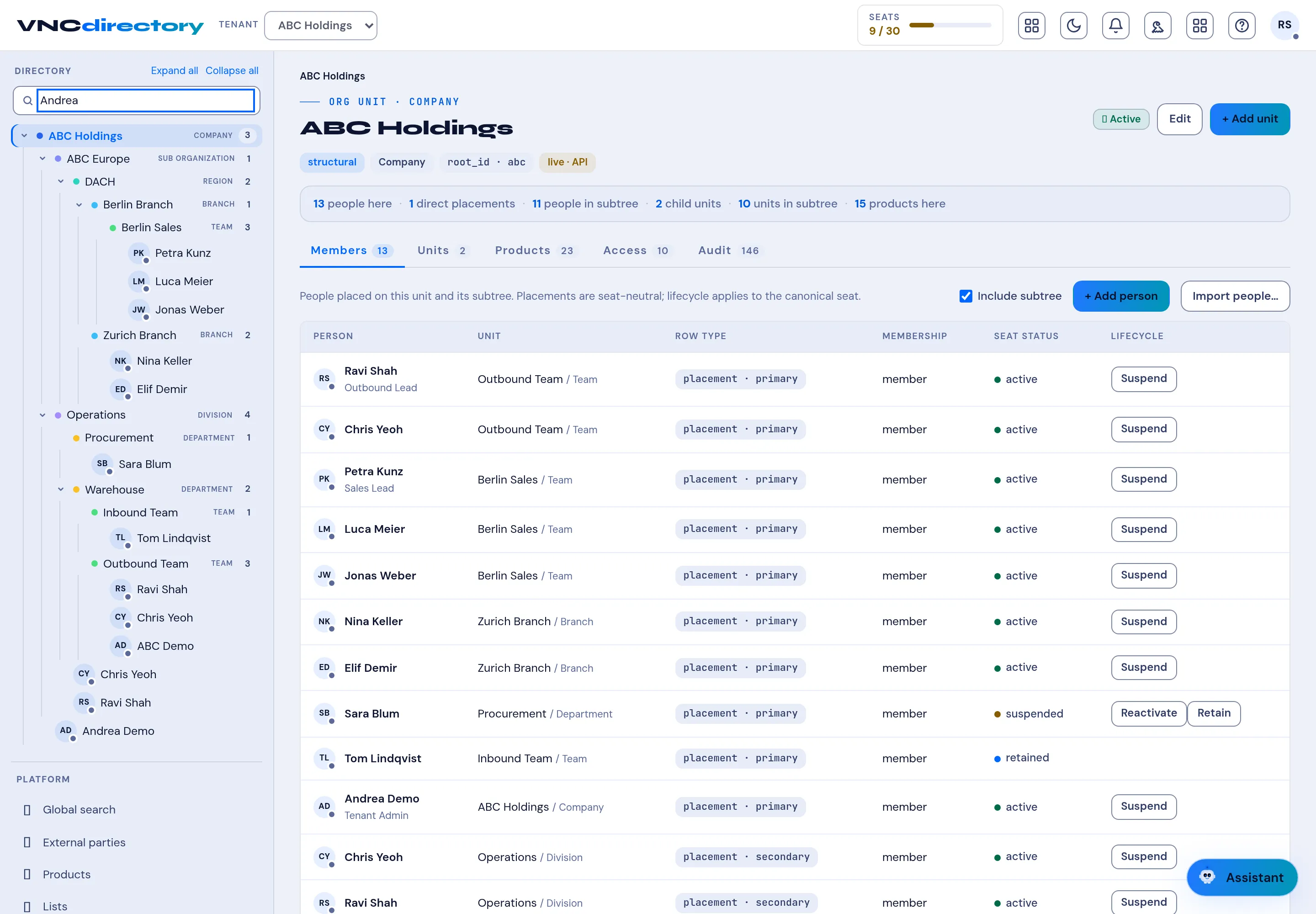
Section titled “1. Open the directory”Open VNCdirectory+ from the portal. The left tree is your organization — company → region → branch → team.
2. Find a person
Section titled “2. Find a person”Type a name in Search, or use Global search for people, units and external contacts at once.
3. Read a unit
Section titled “3. Read a unit”Select a unit. Members lists placements (primary/secondary), membership and seat Lifecycle (active, suspended, retained). Other tabs are Units, Products, Access and Audit.
4. Check entitlement
Section titled “4. Check entitlement”Open Products to see what is assigned where. Products inherit down the subtree, so this is what decides the tiles users see in the portal.
What you learned
Section titled “What you learned”- The directory is the source of truth for people and entitlement.
- Products assigned to a unit flow down to its children.